
Written by Kholene Couana- Customer Success Account Rep.
One of the most common questions organizations ask when planning an Azure deployment is which storage tier to use. The answer depends on how often users access the data and how quickly they need to retrieve it.
Azure Blob Storage is Microsoft’s scalable object storage platform for unstructured data such as documents, backups, images, videos, application logs, and archival information. What makes Azure Blob Storage particularly powerful is its ability to balance performance and cost through multiple storage tiers.
By selecting the appropriate Azure Blob Storage tier, organizations can significantly reduce costs while ensuring data remains available when needed.
The Four Azure Blob Storage Access Tiers
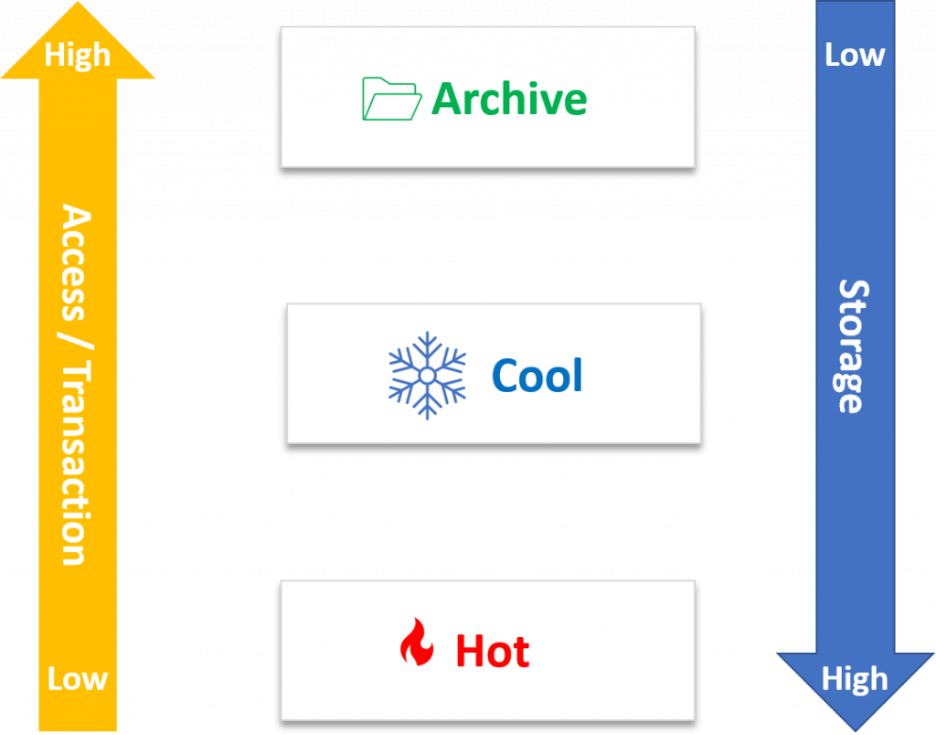
Hot Tier
The Hot tier supports data that users access frequently. Typical examples include:
- Active business documents
- Application files
- Frequently used reports
- Websites and media content
While storage costs are higher in the Hot tier, retrieval costs remain lower. As a result, organizations often choose this tier for information that employees and customers use regularly.
Cool Tier
The Cool tier supports data that organizations access less frequently but still need immediately available. Common use cases include:
- Disaster recovery copies
- Monthly reports
- Older project documentation
- Department archives
Storage costs are lower than the Hot tier, though retrieval costs increase. Many organizations use the Cool tier for information that must remain available but is rarely referenced.
Cold Tier
The Cold tier bridges the gap between Cool and Archive storage. This tier works well for:
- Long-term backups
- Compliance records
- Historical datasets
- Legacy project information
The Cold tier reduces storage costs even further while maintaining relatively quick retrieval capabilities.
Archive Tier
The Archive tier offers the lowest storage cost available in Azure Blob Storage. It is best suited for:
- Regulatory retention requirements
- Long-term compliance data
- Historical records
- Data that may never need to be accessed again
Organizations should understand that retrieving archived data can take several hours. Because of this delay, the Archive tier works best when immediate access is not required.
Optimizing Azure Blob Storage Costs
One of Azure’s most valuable storage features is Lifecycle Management. Organizations can automatically move data between Azure Blob Storage tiers based on age or usage patterns.
For example:
- Move files to the Cool tier after 30 days
- Move files to the Cold tier after 90 days
- Move files to the Archive tier after one year
This automation eliminates manual management and helps organizations optimize storage spending over time.
Choosing the Right Azure Storage Tier
Azure Blob Storage is much more than a place to store files. By understanding the differences between the Hot, Cool, Cold, and Archive tiers, organizations can align storage decisions with business requirements while controlling cloud costs.