
Written by Jerome Stewart- D365 Consultant

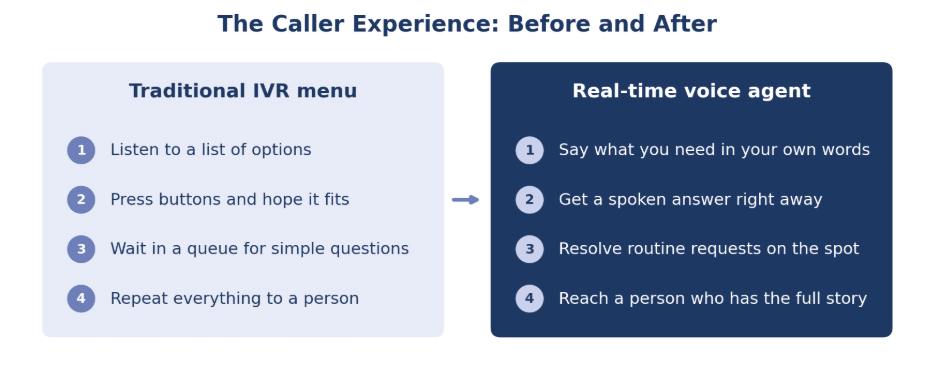
We’ve all been there. You call a company, listen to a list of menu options, press 2, then 4, then 0 because none of them fit, and finally repeat your account number to a person who has no idea what you just told the system.
Traditional IVR menus were built to route calls, not resolve them. Microsoft’s new real-time voice agents in Dynamics 365 Contact Center, generally available since April 27, 2026, change that. Here’s what they are and how your team and your customers can benefit.
What Are Real-Time Voice Agents?
Real-time voice agents are AI agents that hold natural, spoken conversations with callers. Instead of navigating a menu, customers simply say what they need, and the agent responds out loud with almost no delay.
They’re built and managed in Microsoft Copilot Studio and delivered through the Customer Assist Agent in Dynamics 365 Contact Center. Under the hood, they use a speech-to-speech model designed for fast, human-sounding responses.
What Makes Them Different
This isn’t the old “say ‘billing’ or ‘support'” speech recognition. A few things stand out:
- Natural back-and-forth. Callers can interrupt, change topics, or ask two questions at once, and the agent keeps up.
- Language switching. If a caller moves from English to Spanish mid-call, the agent can follow.
- Rules where they matter. Open-ended AI handles the conversation, while fixed, auditable steps govern sensitive moments like taking a payment.
- Keypad fallback. Callers who prefer pressing buttons still can.
How Your Team Benefits
The real value shows up in your queues. A large share of inbound calls are simple, repetitive requests. Real-time voice agents can handle many of them from start to finish, such as:
- Checking an order or shipment status
- Scheduling or rescheduling an appointment
- Answering account and policy questions
That frees your representatives to focus on the complex, high-value conversations where people make the biggest difference.
And when a call does need a person, the handoff is smooth. The agent passes along what the caller wanted, what’s already been tried, and where things stand, so the customer never has to start over. Speaking from experience, that “please repeat your account number” moment is one of the most common complaints we hear about phone support. Removing it goes a long way.
The same agent can also make proactive outbound calls for things like appointment reminders, delivery updates, and payment notices.
Why Copilot Studio Matters
Because these agents are built in Copilot Studio, you don’t need a separate IVR vendor or specialized scripting to make changes. Your team can add a new topic, adjust how the agent responds, and publish updates on your own schedule.
Pricing is consumption-based through Copilot credits rather than per seat, so costs follow actual usage as call volumes rise and fall.
Getting Started the Right Way
A voice agent is only as good as the setup behind it. Before launching, it helps to:
- Clean up existing queues and routing so escalations land in the right place
- Make sure knowledge articles and customer data are accurate
- Connect the systems the agent needs, like Customer Service, Field Service, or your ERP
- Start with a few high-volume call types, then expand once results are proven
How KTL Can Help
At KTL Solutions, we help organizations plan, build, and tune real-time voice agents in Dynamics 365 Contact Center. From routing cleanup to Copilot Studio design to a pilot on your busiest call types, we’ll help you give callers a better experience without adding headcount.
Contact us: https://www.ktlsolutions.com
Want to see what Dynamics 365 Contact Center can do for your team? Schedule a consultation.
Sources: Enable real-time voice agents for voice-driven interactions, Microsoft Learn, and Dynamics 365 Contact Center AI agents, Microsoft Dynamics 365 Blog