
Written by Kholene Couana- Customer Success Account Representative
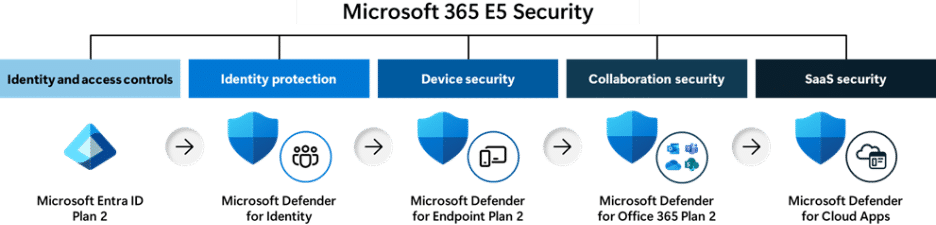
Modern cyberattacks no longer follow a predictable path. Yet many organizations still approach cybersecurity as a collection of separate protection layers:
- Email and collaboration security
- Endpoint security
- Identity security
- SaaS and cloud application security
While each of these areas is important, treating them as independent security pillars can create a dangerous blind spot.
Attackers do not think in silos. They think in graphs.
A cybercriminal may begin with a phishing email, compromise a user’s identity, move laterally to endpoints, access cloud applications, and exfiltrate data, all within a short period of time. To the attacker, these are simply different stages of the same attack.
To an organization relying on disconnected security tools, however, these activities may appear as unrelated alerts generated by different systems.
This is where Microsoft Defender Suite changes the game.
The Problem with Traditional Security Tools
Many organizations have accumulated security products from multiple vendors over time. One platform monitors identities, another protects endpoints, another handles email security, and another focuses on cloud applications.
While each tool may generate accurate alerts, security analysts are often left with the difficult task of manually connecting the dots.
Consider a common attack scenario:
- An attacker compromises a user’s credentials through a phishing campaign.
- The identity platform generates an alert.
- The security team investigates and remediates the compromised account.
- Meanwhile, the attacker has already leveraged that identity to access cloud applications and sensitive data.
- A separate cloud security solution generates another alert hours later.
Because the alerts originate from different systems, security teams may treat them as unrelated incidents. Valuable time is lost while analysts try to determine whether the events are connected.
Microsoft Defender Suite: Security Without the Silos
Microsoft Defender Suite was designed around the reality of modern cyberattacks. Instead of treating email, endpoint, identity, and cloud security as separate domains, Microsoft Defender brings security signals together into a unified security operations experience.
Through a single management portal, security teams can view activity across:
- Identities
- Endpoints
- Email and collaboration workloads
- Cloud applications
- Data and workloads
Rather than presenting analysts with hundreds of disconnected alerts, Microsoft Defender automatically correlates information across these environments to create a more complete picture of an attack.
This unified visibility helps security teams understand not only what is happening, but also how different activities are connected.
For example, Microsoft Defender can identify when:
- A suspicious email is delivered to a user
- The user’s credentials are compromised
- The compromised identity accesses a cloud application
- Malware appears on an endpoint
- Data access patterns suddenly change
Instead of surfacing five separate alerts, Microsoft Defender can correlate these events into a single incident and provide investigators with a timeline of the attack.
The result is faster investigations, better visibility, and more time spent addressing the root cause rather than chasing individual alerts.
AI-Powered Correlation Across Security Domains
Microsoft Defender uses advanced analytics and AI-driven correlation to determine when activity occurring across different systems may be related to the same attacker.
Rather than relying solely on human analysts to connect alerts from multiple products, Microsoft Defender continuously analyzes signals from across the Microsoft security ecosystem.
This allows security teams to:
- Detect coordinated attacks faster
- Reduce alert fatigue
- Improve incident response efficiency
- Understand attacker movement across the environment
- Prioritize the most critical threats
The result is a security operations center that spends less time managing alerts and more time stopping attacks.
Microsoft Defender Suite Licensing Options
For organizations standardizing on Microsoft security technologies, Microsoft Defender Suite provides significant value because many Defender capabilities are included with Microsoft 365 E5.
Organizations using Microsoft 365 E3, Office 365 E3, or Business Premium can also add Microsoft Defender capabilities through additional licensing options. This flexibility allows businesses to strengthen their security posture without replacing existing productivity investments.
As a trusted Microsoft partner, KTL Solutions helps commercial organizations and government contractors navigate Microsoft’s security licensing options and determine the right level of protection for their business.
With the right licensing strategy and a unified security platform, organizations can move beyond siloed security and gain the visibility needed to detect, investigate, and respond to modern threats faster.