
In this blog post, we will look at how you can use JavaScript to check the roles of a logged in user. This will allow you to perform additional security validation via JavaScript that are not inherently available in base.
Why use JavaScript to validate instead of just out-of-the-box options?
Oftentimes security requirements may be more strict in scope than what is possible via out of the box methodologies. For example, you may want all users to be able to see and edit an option set, but you may want some of the option set choices to only be available to a specific subset of users. Due to this requirement, a Field Security Profile would be inadequate as it can only grant Read/Write level access to an option set field as a whole, not the particular choices available within said field.
Approach
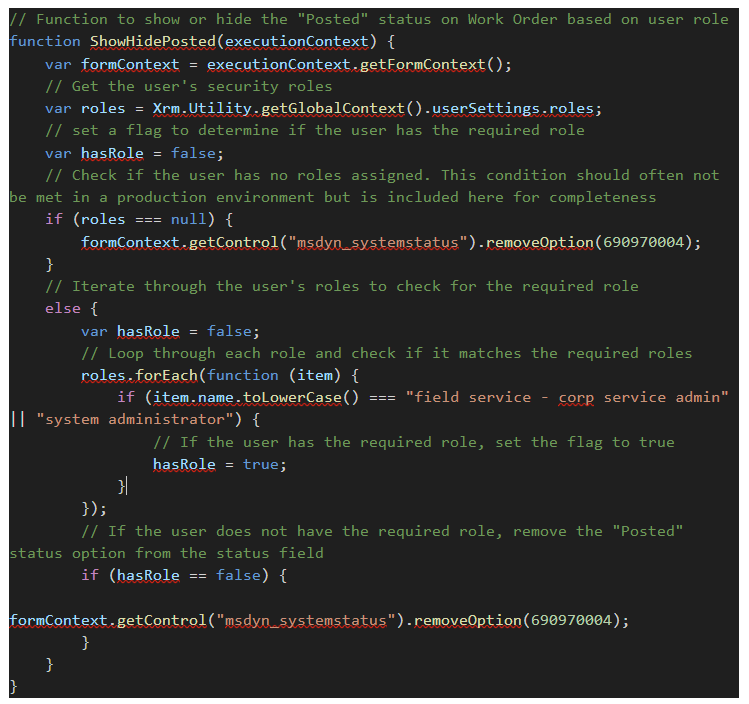
Using the Xrm.Utility.getGlobalContext().userSettings.roles method you can utilize the specific call to retrieve the roles of the logged in user, parse them as necessary, and then perform additional actions based on the results of it.
Step-by-Step Implementation
- Identify the name of the Security Role that you want to use for filtering
- Add JavaScript to the Form
- Create a JavaScript web resource in Dynamics 365 and write a function that checks the logged in user’s roles
- Iterate through the roles and determine if the user has a specific one by setting a Boolean variable to True when the name is matched
- Based on the outcome of this validation, perform the required actions in JavaScript such as be showing/hiding option set values
- Register the JavaScript Function
- In the form editor, add the web resource and register the function on the appropriate event, in the case of the below example it would be for OnLoad
- Test your implementation
- Publish your customizations
Conclusion
Retrieving roles in JavaScript is commonly used to determine user permissions and control access to specific features or options within an application. By checking a user’s assigned roles, developers can dynamically enable or restrict functionality, such as displaying or removing certain status options or menu items. This approach helps ensure security and a tailored user experience.