Written by Argie Radics- Sr. BC Consultant
If You’ve Ever Wondered About the Difference, You’re Not Alone
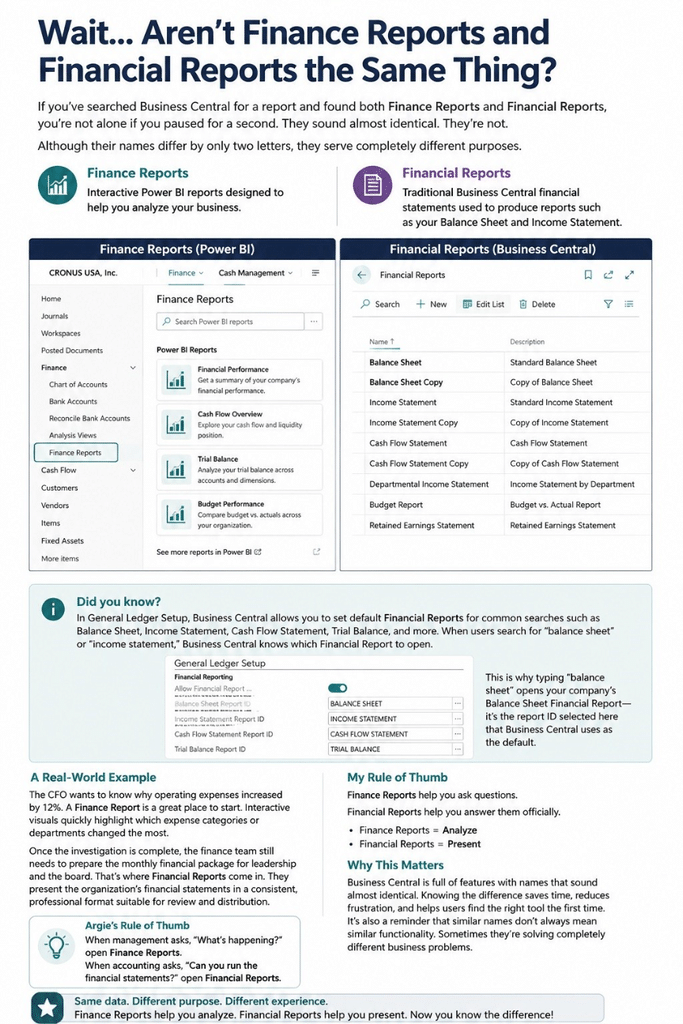
If you’ve searched Business Central for a report and found both Finance Reports and Financial Reports, you’re not alone if you paused for a second.
They sound almost identical.
In fact, this confusion has become even more common as Microsoft has added embedded Power BI experiences to Business Central. As a result, new users and even seasoned consultants often assume these two options are simply different ways to get to the same information.
They’re not.
Welcome to the first article in my new series, “Wait… Aren’t These the Same Thing?” In each post, we’ll compare two Business Central features with nearly identical names and explain what each one actually does, when to use it, and how to remember the difference.
The Short Answer
Although their names differ by only two letters, they serve completely different purposes.
- Finance Reports are interactive Power BI reports designed to help you analyze your business.
- Financial Reports are traditional Business Central financial statements used to produce reports such as your Balance Sheet and Income Statement.
Think of it this way:
- Finance Reports = Analytics
- Financial Reports = Financial Statements
Once you understand that distinction, the names become much easier to remember.
What Are Finance Reports?
Finance Reports are Microsoft’s Power BI reports that surface financial information through dashboards and visualizations.
Rather than printing a report, you’ll typically interact with charts, graphs, KPIs, trends, and drill-down capabilities. Because of this, they’re ideal for exploring data and identifying patterns quickly.
These reports are designed to help answer questions like:
- How are expenses trending?
- Which departments are spending the most?
- What does revenue look like month-over-month?
- Which accounts are driving changes?
- Where should management focus its attention?
Instead of reviewing pages of numbers, you’re exploring your financial data visually.
Consequently, Finance Reports are especially useful for executives, controllers, CFOs, and managers who want to identify trends and make decisions faster.
What Are Financial Reports?
Financial Reports have been part of Business Central for years and remain one of its most powerful financial reporting tools.
Unlike Finance Reports, these reports are built using row and column definitions that allow you to create financial statements exactly the way your organization wants them. In addition, they can be tailored to support specific reporting requirements.
Typical examples include:
- Balance Sheet
- Income Statement
- Profit and Loss Statement
- Cash Flow Statement
- Departmental Financial Statements
- Budget vs. Actual Reports
These aren’t dashboards. Rather, they’re formal financial statements that can be customized with row definitions, column definitions, dimensions, comparison periods, budgets, and calculated totals.
So, if your controller says, “Let’s run this month’s Income Statement,” they’re talking about a Financial Report.
A Real-World Example
Imagine it’s the fifth business day of the month.
The CFO wants to know why operating expenses increased by 12%.
A Finance Report is a great place to start because interactive visuals can quickly highlight which expense categories or departments changed the most. Additionally, trends become easier to spot, helping teams investigate issues faster.
However, once the investigation is complete, the finance team still needs to prepare the monthly financial package for leadership and the board.
That’s where Financial Reports come in.
They present the organization’s financial statements in a consistent, professional format suitable for review and distribution.
In other words, both features use the same underlying accounting data, but they’re designed to solve very different business problems.
My Rule of Thumb
Here’s the memory trick I use:
Finance Reports help you ask questions.
Financial Reports help you answer them officially.
Or even shorter:
- Finance Reports = Analyze
- Financial Reports = Present
If you’re looking for dashboards, trends, and visual insights, you’re probably looking for Finance Reports.
On the other hand, if you’re producing a Balance Sheet, Income Statement, or another formal financial statement, you’re looking for Financial Reports.
Why This Matters
Business Central is full of features with names that sound almost identical, and this is just one example.
Knowing the difference saves time, reduces frustration, and helps users find the right tool the first time.
More importantly, it’s a reminder that similar names don’t always mean similar functionality.
Sometimes they’re solving completely different business problems.
Argie’s Rule of Thumb
When management asks, “What’s happening?”, open Finance Reports.
When accounting asks, “What’s the official financial statement?”, open Financial Reports.
That’s the difference.