
Even If a Power App Is the Backend
Written by Bryan Goldman
If you’ve ever thought, “A customer or partner portal sounds great, but it must be complicated and expensive,” you’re not alone. For years, portals required custom development, long timelines, and ongoing maintenance that only developers could handle. That reputation still lingers, even though the technology has changed dramatically.
Today, the reality looks very different. By combining Power Pages on the front end with Power Apps and Dataverse on the back end, organizations can build secure, scalable portals much faster than many people expect.
The biggest advantage is simple: you can deliver a professional portal experience while keeping your data, business logic, and processes in tools your team already knows how to manage.
How Power Pages and Power Apps Work Together
Power Pages and Power Apps complement each other, which is what makes this approach so effective.
Power Pages focuses on the external experience. Customers, partners, and vendors use the portal to access information, submit requests, and interact with your organization. Meanwhile, Power Apps and Dataverse manage the internal logic, data structure, and business processes behind the scenes.
This separation keeps complex logic out of the portal itself. Instead of forcing the portal to handle every process, you can use it as a secure, user-friendly entry point into systems that already support your business operations.
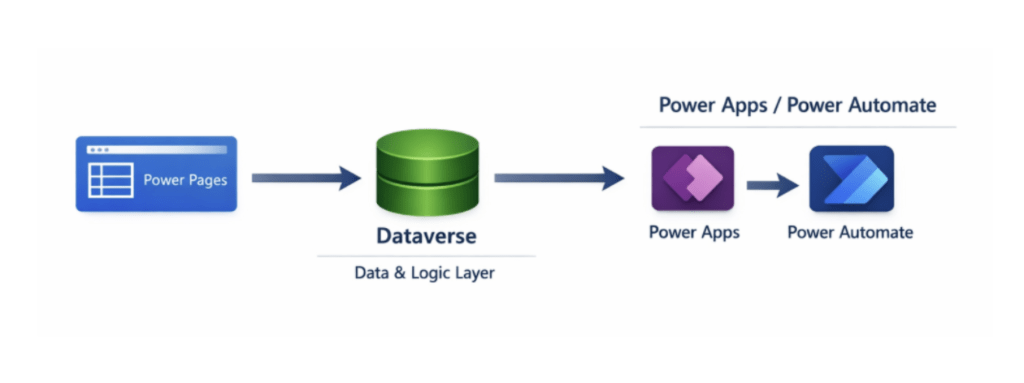
As a result, the architecture stays cleaner, easier to maintain, and more scalable over time.
Creating a Portal Is Easier Than Many Teams Expect
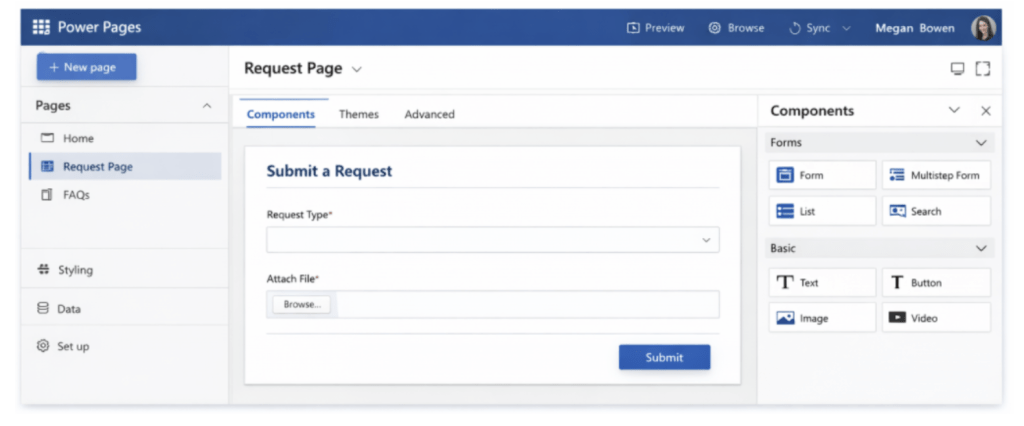
Many organizations are surprised by how approachable Power Pages has become. Rather than starting from scratch or writing large amounts of HTML, teams can use a visual design studio that includes templates, page layouts, and form components already connected to Dataverse.
You can design pages, add forms, and configure navigation in a way that feels much closer to building a Power App than building a traditional website.
The platform also handles authentication and security. Instead of creating a custom login system or developing your own access controls, you can use capabilities that already exist within the Microsoft ecosystem.
Because of this, teams spend less time managing infrastructure and more time improving the user experience.
Let Power Apps Handle the Business Logic
The real power of this architecture appears after users interact with the portal.
When users submit information, Dataverse stores the data and immediately makes it available to the rest of your solution. From there, Power Apps and Power Automate can manage approvals, validations, notifications, status updates, and other business processes.
Internal employees continue working in familiar model-driven apps while external users interact only with the portal.
Keeping business logic in a central location makes updates easier and reduces the risk of introducing inconsistencies across systems.
A Real-World Portal Example
Consider a customer request portal.
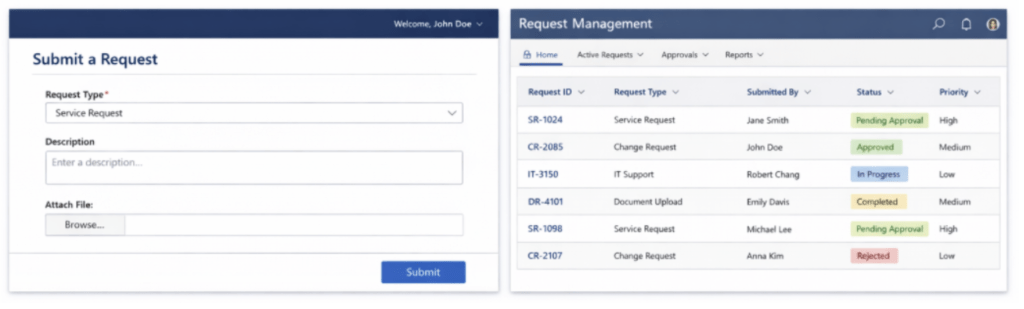
A customer logs in, submits a request, and uploads supporting documents. Dataverse captures that information and makes it available to the internal team responsible for processing the request. Team members manage the request through a model-driven Power App while automated workflows route tasks, trigger notifications, and track progress.
At the same time, the customer can log back into the portal and view real-time status updates.
From the customer’s perspective, the experience feels polished and intuitive. Internally, the team continues working in tools they already know and use every day.
Why This Approach Reduces Long-Term Risk
Beyond speed and ease of implementation, this architecture helps organizations reduce long-term risk.
Dataverse centralizes business logic rather than scattering it across custom scripts and disconnected components. The platform enforces security controls consistently, reducing reliance on custom code. When business requirements change, teams can update backend processes without redesigning the entire portal experience.
That flexibility becomes increasingly valuable as organizations grow and evolve.
The Bottom Line
Building a portal no longer requires you to choose between simplicity and capability.
Power Pages and Power Apps provide both. You get a clean, intuitive experience for external users while maintaining a robust, manageable backend that can grow alongside your business.
If your organization already relies on Power Apps internally, extending that same foundation to customers, partners, or vendors isn’t a major leap. It’s often the next logical step.