
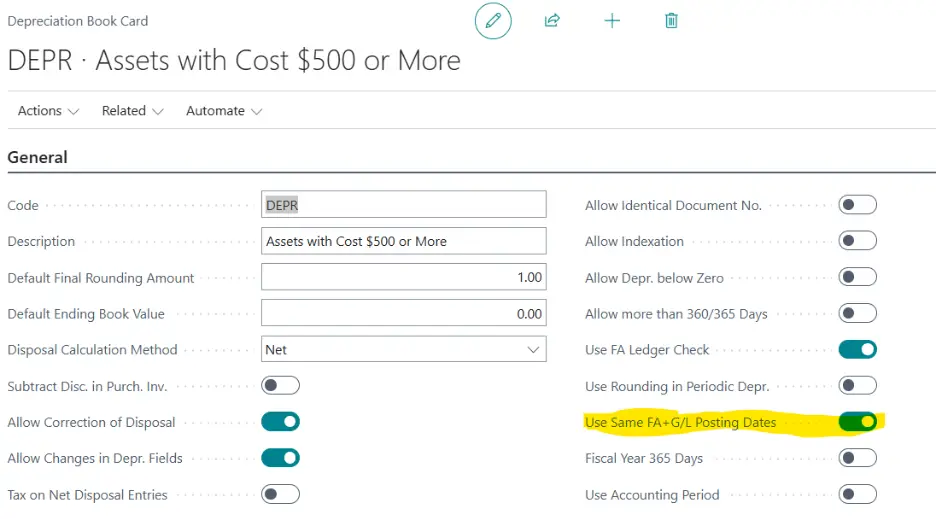
Specifies whether to indicate that the Posting Date and the FA Posting Date must be the same on an FA journal line before posting.
In the Calculate Depreciation batch job:
• FA Posting Date corresponds to the date that the system will consider when searching for the Fixed Assets that may need to be depreciated.
• Posting Date corresponds to the date that will be used to post the depreciation amounts in the General Ledger Entries.
There are cases where you can have a specific date in General Ledger Entries and a different date in FA Ledger Entries (for example, when migrating opening balances).
Additionally, in the Depreciation Book card, you can enable the field “Use same FA+G/L Posting Date” if you want to make sure that both fields are set to the same date in the journal line before posting. When executing the Calculate Depreciation batch job with different dates and with this field enabled, the system will return an error “FA Posting Date and Posting Date must be identical. Use Same FA+G/L Posting Dates must be enabled in the Depreciation Book Card:
| FA Posting Date | Enter the fixed asset posting date to be used in the batch job. This date is used as the ending date in the depreciation calculation. If depreciation was posted to the asset previously, the fixed asset posting date on the last depreciation entry is used as the starting date in the depreciation calculation. If this is the first depreciation entry for the asset, the Depreciation Starting Date table, as defined in the FA Depreciation Books window, is used as the starting date in the depreciation calculation. Note that the program defines February 28th or February 29th (depending on whether it is a leap year), the 30th, and the 31st (for the other months in the year) as the last day of the month. For example, if any of these dates were used in the last depreciation entry and you enter the first date of the next month in the FA Posting Date field in the batch job, the program will calculate depreciation for one day. By using the fields below, you can specify the number of depreciation days the program will use to calculate depreciation. |
| Use Force No. of Days | Select if you want the program to use the number of days, as specified in the field below, in the depreciation calculation. |
| Force No. of Days | Enter a number if you want the program to use this number of days in the depreciation calculation. (You must also place a check mark in the field above.) |
| Posting Date | Enter the posting date to be used in the batch job. If you have activated the Use Same FA+G/L Posting Dates field in the Depreciation Book table, you can leave this field blank and just fill in the FA Posting Date field. The posting date is copied to the resulting journal lines. |
| Document No. | Leave this field blank if you have set up a numbering series for the fixed asset journal batch in the No. Series table and the journal is empty. The batch job automatically fills in the resulting journal lines with the next available number in the series. |
| Posting Description | Enter a text for the journal entries that result from the batch job. |
| Insert Bal. Account | Select if you want the batch job to automatically insert balancing accounts in the resulting journal. The batch job uses the accounts that you defined in the FA Posting Group table. |