
Written by Jerome Stewart- D365 Consultant
If you’ve ever set up a contact center in Dynamics 365, you know how many moving parts are involved. Channels, workstreams, queues, skills, operating hours, phone numbers, routing rules. Each one lives in its own corner of the admin center. As a result, one missed setting can send customers to the wrong queue.
Microsoft’s new Service Operations Agent aims to take a lot of that pain away. Here’s what it is, what it can do today, and how your team can get the most out of it.
What Is Service Operations Agent?
Service Operations Agent is an AI assistant for Dynamics 365 Contact Center administrators. It lives inside the Copilot Service admin center, so you can describe what you need in plain English and make changes from there.
Microsoft introduced it in public preview in April 2026. The release plan lists general availability in July 2026.
What Can You Ask It to Do?
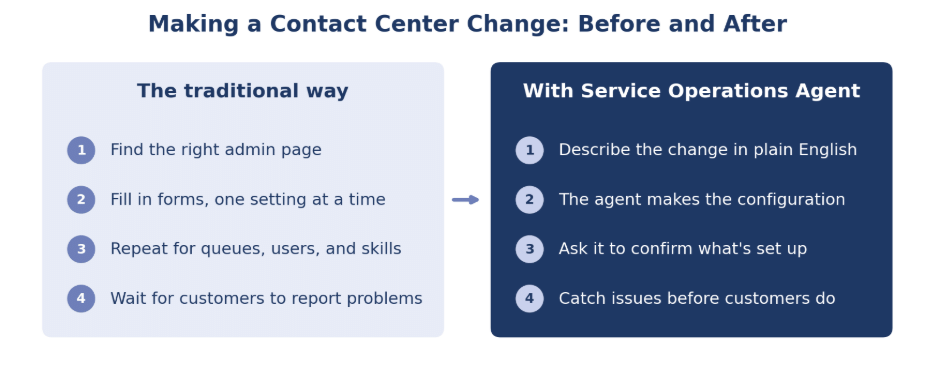
Think of it as a teammate who knows where every setting lives. For example, you can ask it to create a workstream, update a queue, or check what’s already set up.
- “Set up a voice workstream for our support line and make Tier 1 Support its default queue.”
- “Change the billing queue to round robin assignment.”
- “Add Maria and James to the returns queue and give them the Spanish skill.”
- “Which voice queues do we have right now?”
- “What phone numbers are tied to our Azure Communication Services resource?”
You can also ask it to set operating hours, sync phone numbers from Azure Communication Services and Microsoft Teams, or create route-to-queue rules. If something goes wrong, you can ask it to run diagnostics on supported channels and explain what’s likely causing the issue.
How Your Team Benefits
The biggest win is speed. For example, when a supervisor needs a new queue for a product launch, IT can make the change the same day. Routine updates that used to mean a ticket and a wait can happen in a quick conversation.
That also makes it easier to share the work. Admins who understand what the business needs can make everyday changes without knowing every screen by heart.
In our experience, many apparent contact center outages start with a configuration gap, like a workstream pointing at the wrong queue. By asking the agent what’s set up, you can spot issues like a missing phone number or an empty queue before customers find them for you.
What to Know Before You Start
The agent currently works in English only. You’ll also need the Omnichannel administrator role and a Power Platform pay-as-you-go plan tied to an Azure subscription. For troubleshooting, set up Application Insights and connect it to Contact Center.
Some advanced settings still need to be configured manually. For instance, you’ll handle classification, assignment, and overflow rulesets yourself, along with route-to-queue rules that use conditions.
Microsoft is also rolling out conversation orchestration playbooks that pair well with the agent. For example, you can use a playbook to move a high-priority customer up in the queue after a long wait or offer a callback when no one is available.
How KTL Solutions Can Help
At KTL Solutions, we help organizations get Service Operations Agent running on a solid foundation. That often starts with cleaning up existing queues, workstreams, and routing so admins can see how calls are handled today.
From there, we help set up roles, billing, and Application Insights. We also train your admins on what to ask the agent and when it makes sense to handle a change manually.
The goal is simple. Spend less time clicking through settings and more time improving the customer experience.
Want to see what Dynamics 365 Contact Center can do for your team? Schedule a consultation with KTL Solutions.
Source — Microsoft Learn, “Use Service Operations Agent in Dynamics 365 Contact Center.”