
 Written By Barry Crowell
In this blog, we will explore Predicting Accounts Receivable Risk with Power BI using Dynamics GP data. By adding probability-based predictions to your AR reports, your collections team can focus on high-risk accounts. This approach helps accelerate cash inflows and improves overall financial management.
Step 1: Prepare Your Data in Power Query
First, duplicate the AR Details table in Power Query. Then, apply feature engineering to make each invoice easier to evaluate.
Add Date Features
We include:
- Invoice age
- Days to due
- Payment delays
These features help the AR team understand which invoices need attention next.
Add Financial Ratios
Next, we calculate:
- Credit utilization
- Amount per day late
This step ensures that the model reflects customer credit behavior.
Add Risk Scoring
We combine multiple factors into a risk score:
- Days Late (30%)
- DSO Performance (20%)
- Hold Status (20%)
- Customer History (25%)
- Credit Utilization (15%)
- Invoice Age (10%)
These scores highlight invoices with the highest chance of delayed payment.
Categorize Features
Finally, we add categories such as:
- Amount categories
- DSO categories
These make it easier to segment accounts based on risk.
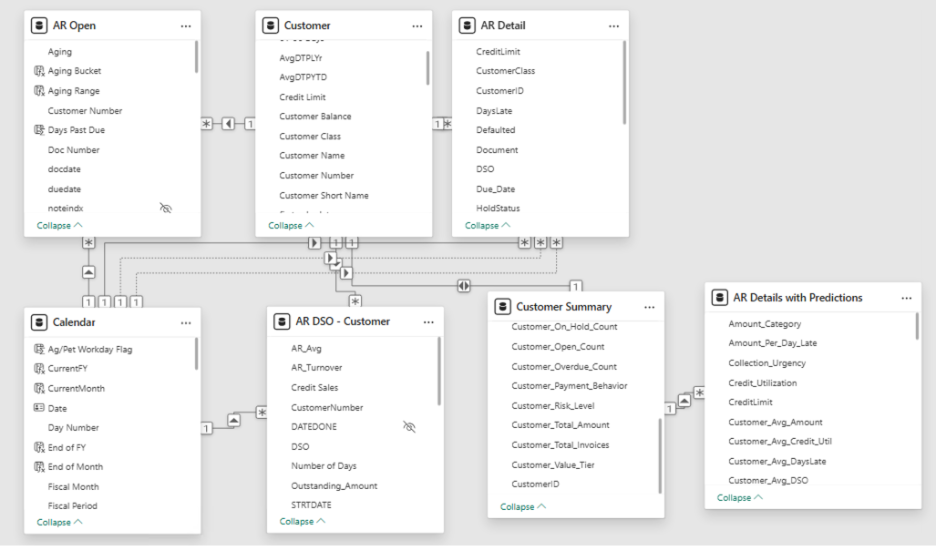
Step 2: Create Power BI Measures
After transforming the data, we create measures in Power BI for predictive insights:
- High Risk Amount: Total invoices at high risk
- High Risk Percentage: Share of total AR at high risk
- Expected Loss Total: Sum of expected loss
- Expected Loss Rate: Percentage of total AR expected to be lost
- Average Default Probability: Overall probability of default
Collection Metrics
- Invoices Requiring Action: Count of invoices needing attention
- Critical Urgency Count: Count of critical overdue invoices
Time-Based Metrics
- Overdue Amount: Sum of overdue invoices
- Severely Overdue Amount: Sum of invoices overdue more than 90 days
Customer Metrics
- High Risk Customers: Count of customers in high-risk category
- Average Customer Default Rate: Average default rate across all customers
Step 3: Build the Collections Priorities Report
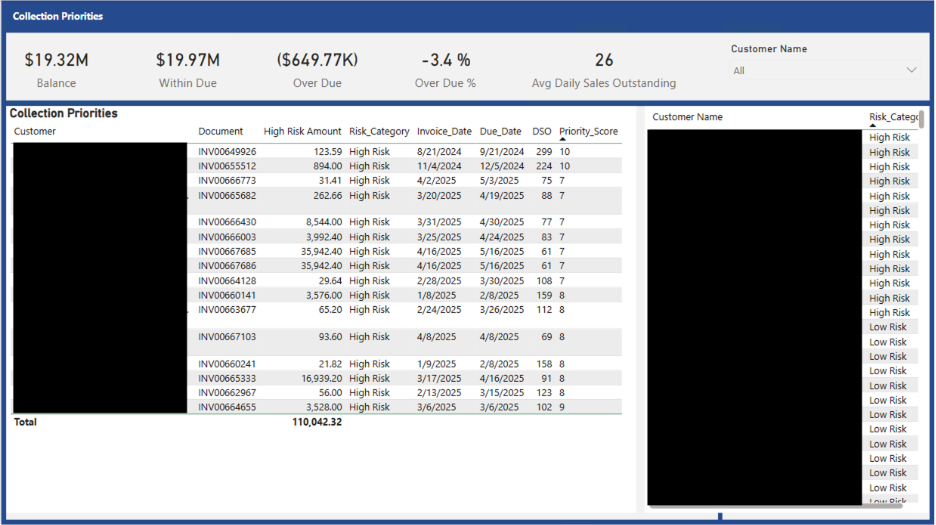
With the new measures, the Collections Priorities report highlights:
- Prioritized Collections: Focus on high-risk invoices first
- Proactive Risk Management: Detect potential issues early
- Customer Insights: Understand payment behaviors
- Performance Tracking: Monitor collections efficiency
- Executive Reporting: Provide clear KPIs for management
By using these insights, the AR team can act proactively rather than reacting to late payments.
Conclusion
Throughout this blog series, we explored how to maximize the value of your Accounts Receivable data. From basic AR reporting to predictive insights, Predicting Accounts Receivable Risk with Power BI empowers your team to make smarter decisions, accelerate collections, and strengthen cash flow.
Whether you are starting AR reporting or enhancing existing reports with predictive analytics, a structured data strategy can make a measurable difference.
Need Help?
KTL Solutions can help you build or optimize your AR reports. Our team ensures your data turns into actionable insights and measurable results.