
Written By Argie Radics
If you use Business Central (BC) regularly, you’ve probably noticed the Analyze button on list pages—and maybe ignored it. I did too. At first, it seemed like an extra feature I didn’t have time to explore.
But it turns out, Analysis Mode in Business Central is actually incredibly useful. It helps you answer questions directly in the system without exporting data or building separate reports.
What Analysis Mode Does
Analysis Mode lets you work with data right inside list pages. You can:
- Group and filter information
- Total amounts
- Rearrange fields like a pivot table
And the best part? You stay in BC the whole time. No exporting, no reports, no Power BI needed. It’s a fast way to answer questions without leaving the page you’re already on.
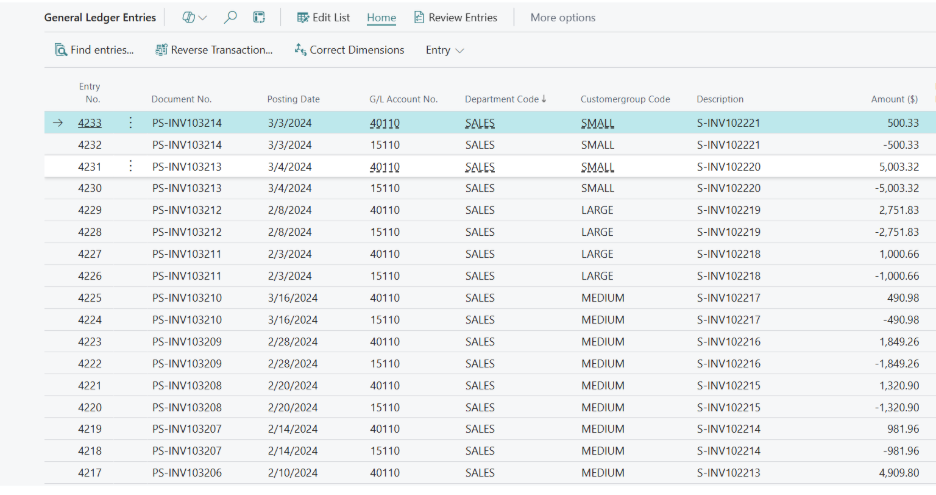
Standard List Page (Before clicking “Analysis Mode”)
Quick Example: Summarizing General Ledger Entries
Let’s say you want to summarize Customer Group dimensions in General Ledger Entries. Here’s how Analysis Mode makes it simple:
- Click Analysis Mode
- Drag Customer Group into rows
- Drag Debit Amount into values
- Drag Credit Amount into values
- Filter by date
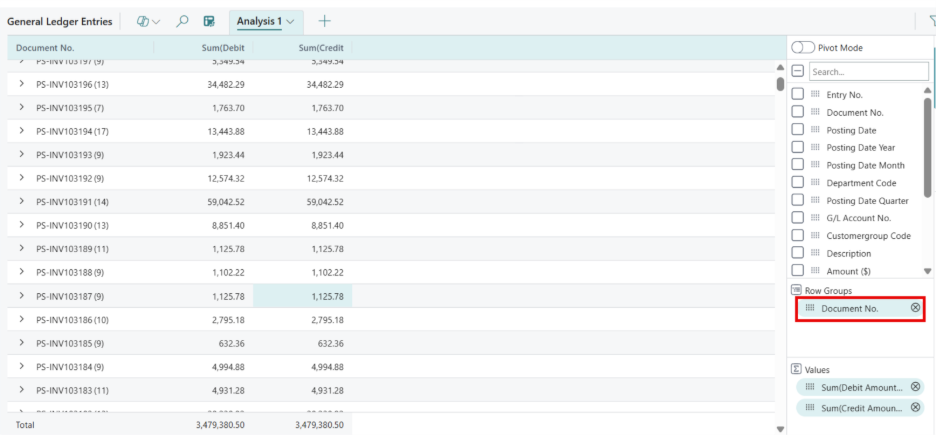
The result is a clean summary showing totals by Customer Group. You can sort, drill down, or tweak it instantly. No report building required.
You can also summarize by Document No. or any other field, and the totals stay consistent. It’s flexible and immediate.
Why I Use Analysis Mode
Analysis Mode is fast, simple, and keeps me working inside BC. Some key benefits:
- Faster than exporting to Excel: No waiting for data to download or formulas to recalc.
- Keeps data where it lives: You don’t leave BC, reducing errors and confusion.
- Great for one-off questions: Perfect for quick checks without creating a formal report.
I often use it to verify numbers without bothering someone on the finance or reporting team. It’s not flashy, but it’s solid and efficient.
Worth Trying
If you work in Business Central daily, Analysis Mode is worth exploring. It’s built in, easy to use, and saves time. You don’t need extra tools or complicated setups. It’s just a better way to interact with the data you already have.
Start using it today to work smarter and get answers faster.