
Written By Jerome Stewart
Introduction to Power Automate Flow Triggers for Dataverse
Power Automate Dataverse triggers are essential for building automation in Microsoft Dynamics 365. Power Automate is a low-code/no-code platform that integrates seamlessly with Dataverse, enabling users to create flows that improve productivity and reduce manual work. These triggers define when a flow should start based on specific changes or events in Dataverse, replacing and enhancing classic workflow functionality from earlier CRM systems.
💡 Learn more about Microsoft Dataverse on Microsoft Learn.
Types of Power Automate Flow Triggers for Dataverse
Power Automate offers several Dataverse trigger types to power your automation workflows. Below are the two most common::
1. When a Row is Added, Modified, or Deleted
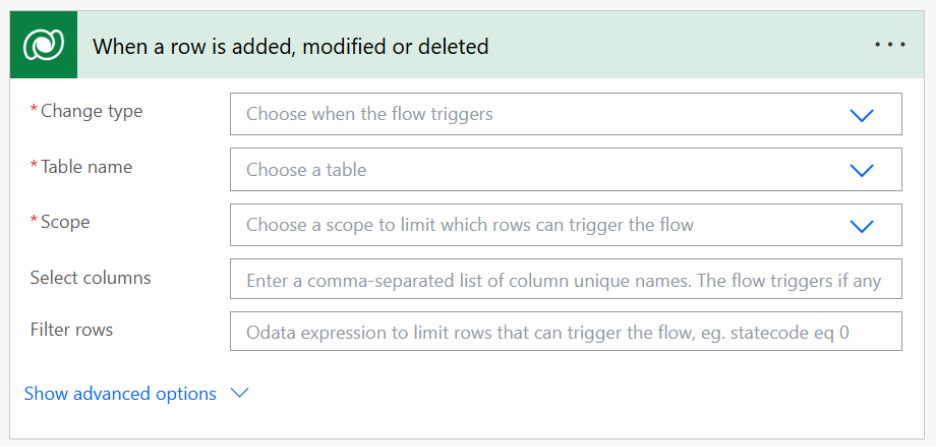
The Power Automate Dataverse trigger for row changes starts a flow when a Dataverse table record is created, updated, or deleted:
- Sending automated notifications when records are added or modified.
- Updating related records when a field changes.
- Performing cleanup actions when records are deleted.
Example Use Case:
A Service Technician can receive an automatic email when a new Inventory Transfer Request is submitted. The flow uses the When a Row is Added trigger to send the notification.
Trigger Options:
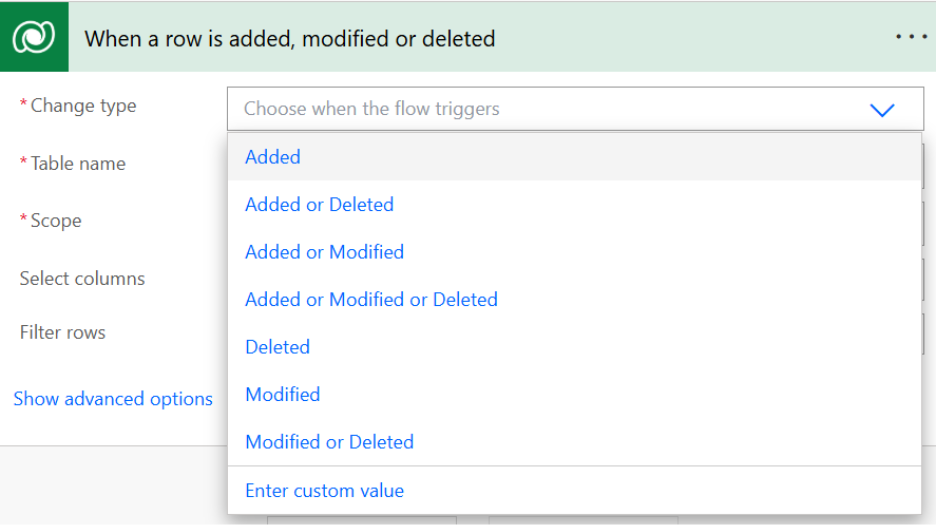
- Change Type: Controls whether the flow fires on Added, Modified, or Deleted actions.
- Table Name: Defines the Dataverse table to monitor.
- Scope: Sets the ownership level that triggers the flow — User, Business Unit, Parent: Child, or Organization.
- Select Columns: Specifies which fields trigger the flow when modified.
- Filter Rows: Uses OData expressions to refine which rows activate the trigger (e.g.,
statecode eq 0). - Delay Until: Postpones trigger evaluation until a future time.
- Run As: Determines which user context runs the flow — Flow Owner, Record Owner, or Modifier.
Pro Tip: For advanced OData filters, use the FetchXML Builder tool in XRM Toolbox. It can convert FetchXML queries directly into Power Automate parameters.
2. Recurrence Triggers
Recurrence triggers run flows on a set schedule (daily, weekly, or monthly). Although not Dataverse-specific, they often interact with Dataverse data to automate periodic tasks.
Example Use Case:
A marketing team can use a recurrence trigger to generate weekly reports summarizing customer interactions from Dataverse. The flow compiles the data into an HTML table and sends it automatically via email.
Best Practices for Power Automate Flow Triggers for Dataverse
To get the most out of Power Automate Flow Triggers for Dataverse, consider these best practices:
- Limit Scope: Use filters to restrict triggers to relevant rows and events. This minimizes unnecessary flow runs and saves system resources.
- Combine Flows Thoughtfully: If multiple flows use similar triggers, merge them when possible to prevent duplication.
- Optimize Performance: Keep flows efficient by breaking large ones into smaller, modular processes.
- Monitor and Audit: Use Power Automate’s monitoring tools to track performance. Set up email alerts for flow failures or threshold warnings.
For detailed Microsoft documentation, visit Power Automate Learn Hub.
Harnessing Automation in Microsoft Dynamics 365
Power Automate Dataverse triggers give organizations the tools to automate processes intelligently within Microsoft Dynamics 365. Whether you’re configuring a trigger when a row is added, modified, or deleted, or scheduling recurring flows, the right setup unlocks powerful automation across your entire operation.
By experimenting with these trigger types and applying best practices, you can unlock the full potential of Power Automate and Dataverse for your organization’s digital transformation. Contact KTL for more information today.